
Download Swish – SFTP, file transfer, Windows, productivity, advanced users, secure file transfer, direct access, fast file transfer, remote file management, SFTP client
Overview
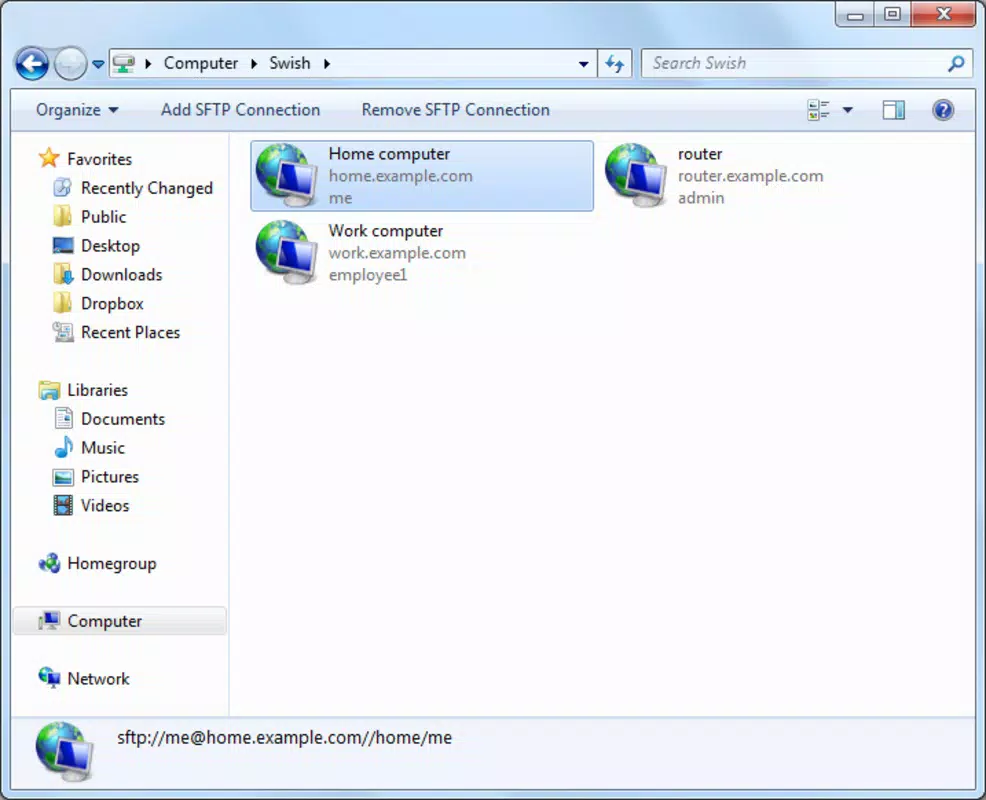
Swish is a specialized productivity tool designed for advanced users who require efficient, direct access to SFTP (Secure File Transfer Protocol) servers. The application integrates seamlessly with Windows File Explorer, offering a streamlined workflow for professionals managing remote file systems. By installing Swish, users gain immediate access to SFTP servers through a dedicated shortcut in My PC, eliminating the need for third-party clients and reducing the complexity of file transfer operations. This functionality is particularly valuable for developers, system administrators, and IT professionals who regularly handle large datasets or server-side configurations.
Swish addresses a common pain point in remote file management: the time-consuming process of launching separate SFTP clients, entering credentials, and navigating complex interfaces. Instead, the app provides a direct, one-click connection path, significantly reducing operational overhead. Its purpose is not to serve as a general-purpose file manager but to enhance the efficiency of users already familiar with SFTP protocols. The app’s niche focus makes it a powerful utility within the Windows productivity ecosystem, especially for those seeking faster, more reliable access to remote servers.
The developer, Swish, has not provided additional details about the company’s background or history. However, the app’s release date of October 2, 2014, indicates a long-standing presence in the technical user community. Despite its age, Swish continues to serve a dedicated user base, suggesting stability and reliability. Real-world use cases include deploying code updates, backing up server files, and synchronizing project assets across distributed environments. For advanced users, the app represents a practical solution that minimizes friction in daily workflows.
Key Features & Functionality
- Direct SFTP Access via File Explorer Integration: Swish adds a persistent shortcut in My PC, allowing users to connect to SFTP servers with a single click. This eliminates the need to open a separate application or manually configure connection details each time.
- Seamless Windows File Explorer Integration: The app mirrors native Windows file management behaviors, enabling drag-and-drop operations, file renaming, and folder navigation directly within the SFTP environment.
- Time-Efficient Workflow for Frequent SFTP Users: By reducing the number of steps required to initiate a transfer, Swish minimizes delays and streamlines repetitive tasks, particularly beneficial when managing multiple servers or large file sets.
- Designed for Technical Proficiency: The application assumes prior knowledge of SFTP, server credentials, and remote directory structures, making it unsuitable for beginners but highly effective for experienced users.
- Secure File Transfer Protocol Support: Swish leverages standard SFTP encryption to ensure data integrity and confidentiality during transfers, aligning with enterprise security standards.
For example, a system administrator managing multiple web servers can use Swish to quickly upload updated configuration files without switching between applications. Similarly, a developer can deploy code changes directly from their local workspace to a staging server, improving deployment speed and consistency. The app’s functionality is optimized for users who value precision, speed, and control in remote file operations.
Interface, UX & Performance
Swish features a minimalistic interface that prioritizes functionality over visual flair. The design integrates naturally with the Windows File Explorer environment, using familiar icons, folder structures, and context menus. Navigation is intuitive, relying on standard Windows conventions such as double-clicking to open directories and right-clicking for context-sensitive actions. This consistency reduces the learning curve for users already accustomed to Windows file management.
The application is lightweight, with a file size of 4.2 MB, which contributes to its fast startup and low resource consumption. Although the developer did not list formal performance metrics, the app’s design suggests efficient operation even on older or resource-constrained systems. Users can expect responsive interactions when browsing remote directories or initiating file transfers.
Stability appears to be a strength, given the app’s long-standing release history. However, no specific information was provided regarding crash reports, update frequency, or compatibility with newer Windows versions. The lack of detailed documentation or support channels may pose challenges for users encountering issues. Overall, the UX is tailored to experienced users who prioritize efficiency over guided assistance.
Platform Compatibility & Technical Requirements
Swish is designed exclusively for the Windows platform and requires a compatible Windows operating system. The app’s version is listed as 1.0.0, and it has a file size of 4.2 MB. Specific minimum OS requirements were not listed by the developer, nor were any hardware specifications provided.
Given its release date in 2014, the application likely supports Windows 7 and later versions. However, compatibility with newer Windows iterations such as Windows 11 cannot be confirmed without official documentation. Users should exercise caution when installing on updated systems, as legacy applications may encounter compatibility issues or security restrictions.
The developer did not specify whether the app supports 32-bit or 64-bit architectures. The absence of detailed technical requirements means users must rely on trial installation to assess compatibility. This lack of transparency may affect adoption among users seeking guaranteed system readiness.
Pros and Cons
- Direct SFTP access through Windows File Explorer integration
- Minimal resource usage and fast performance
- Designed for advanced users with technical expertise
- Secure file transfer using SFTP protocol
- Streamlined workflow reduces repetitive tasks
- No official documentation or support channels provided
- Compatibility with modern Windows versions not confirmed
- Limited to Windows platform
- Price point of $20.00 may be high for niche utility
- No visible update history or version improvements listed
FAQ
Is Swish compatible with Windows 11?
The developer did not specify compatibility with Windows 11. Users are advised to test the application on their system before relying on it for critical tasks.
Does Swish support 32-bit Windows systems?
Specific architecture requirements were not disclosed. Installation on 32-bit systems is possible but not guaranteed without further technical details.
Is Swish safe to download and install?
Swish is distributed as a standalone executable with no known malware. However, users should download from trusted sources and verify file integrity when available.
Can I use Swish without prior SFTP knowledge?
Swish is designed for advanced users with experience in SFTP protocols. It does not include guided tutorials or beginner support.
Are there regular updates for Swish?
The developer has not provided information about update frequency or future development plans. The current version is 1.0.0, released in 2014.
Final Thoughts
Swish stands out as a focused, efficient tool for advanced Windows users who rely on SFTP for daily operations. Its ability to integrate directly with File Explorer offers a significant productivity boost, particularly for professionals managing remote servers or large-scale file transfers. While the app lacks modern polish and updated documentation, its core functionality remains relevant for its intended audience.
For system administrators, developers, and IT specialists who value speed and direct control, Swish delivers tangible benefits. Its secure file transfer capabilities and minimal footprint make it a reliable choice in a niche but essential category. Despite its age and limited support, the app continues to serve a dedicated user base seeking a no-frills solution.
Download Swish now


